
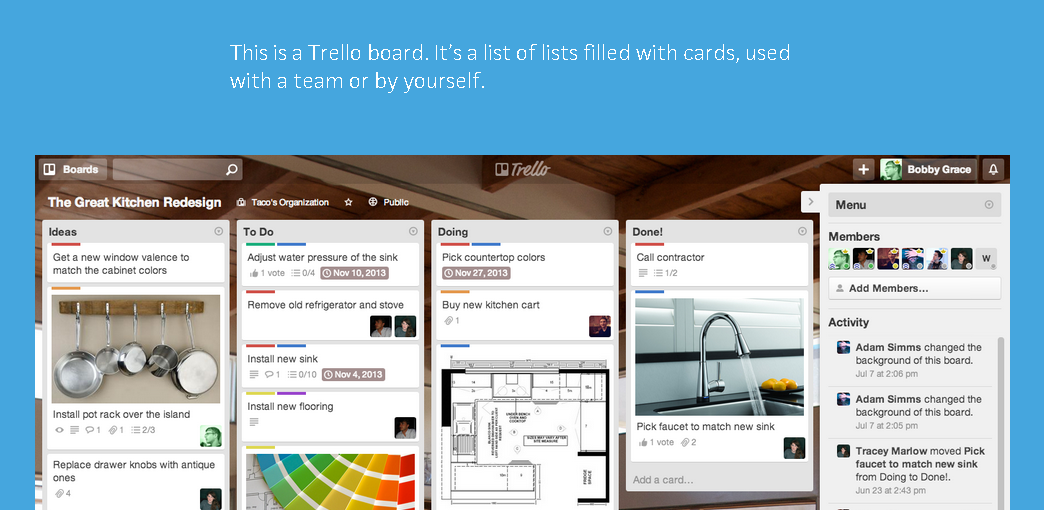
One of the worst things about having multiple projects going on at any given time is knowing where you’re at on all of them. I do use Springpad to organize my projects, but it’s mostly a note-taking/resource-saving tool for me, not necessarily organizing tasks. Enter Trello – a free online project management tool that’s super versatile in its design, letting it be useful for organizing solo projects, team efforts, and of course, keeping track of all of your projects at once! In the short & sweet (under five minutes) video below I share how I use it to do that.
Let me know if you have any questions about getting started using Trello – I’d love to help. How do you keep track of all of your projects?
PS: Like I said – the Productivity for Multipotentialites course is now open for registration (registration closes on Friday night at midnight PST). If you want to stop spinning your wheels & start making more progress on + time for all of your projects, come join us!
It covers:
- What’s a system, and why you need them
- How to figure out what kind of systems you need
- How to get your systems out of your head & onto paper (in a creative-person-friendly fashion)
- How to make sure you stick to your systems
- Maintaining your systems
Want to get instant access? Sign up below – you’ll be emailed the lessons over the next 4 days, or have the option to download them all in one PDF. You’ll also get access to the other VIP goodies inside the Parlor, including the teleclass archives, the Idea Refinery Worksheet, and the monthly dry erase planner.

Another post full of useful information Michelle! I have not heard of either Springpad or Trello but now I want to experiment with them both because I do have multiple projects going on all the time and I do need assistance organizing them!
Thanks Bri! I’m glad you liked it – let me know if you have any questions about either of them, I love helping people make these tools work!
WOW, I really love that you made this video… I looked at Trello the first time I heard you mention it, but when I looked at it my head exploded
Seeing this video makes me want to go look again… Think it could be SUPER useful…
Thanks Michelle!
Thanks Angel – I’m almost wondering if maybe I should do a series of these short 5 minute videos with tips & tricks for different online tools, even if I don’t use the tool in question all the time…because it seems like that “head exploding” overwhelm is something that many people get when they look at a tool and don’t already have ideas of how to use it. Glad you liked the post
Holy. Cow.
Please post stuff like this more often! I learn so much from the things you seem to just toss off the top of your head. I’m really loving the video format so that it’s easy to see what you’re talking about, too. Thank you, thank you!
Thank you Jessica!! I think I will start posting videos like this more often – they’re fun to make for me and it seems like people enjoy them. Maybe I’ll start a “how to videos” post series or something.
Glad you enjoyed!!
Thanks for sharing Michelle! I recently started looking for a better way to keep track of stuff I need or want to do. In the future I will also need to keep track of multiple projects so I want something that can do that too. I’m trying out Todoist (http://todoist.com) & I liked it at first but now I’m not sure if it’s going to work all that well for managing multiple projects. After watching your videos & checking out the websites, I think Trello &/or Springpad will probably work better for me. I’ve bookmarked them both to try later. Thanks Michelle!
Let me know what you think of Todoist – maybe I’ll feature it in a future video post
And yeah, if you have any questions about Trello or Springpad, hit me up! Always looking for blog post ideas. Thanks Sharise, I’m glad you liked the post!!
I am all excited to begin implementation of this Trello. I have SO many pots on the stove it’s hard to keep track. Who knew there was something out there that could help (other than, as you mentioned, a poster board…)
THANK YOU …
You’re welcome Marita! Let me know if you have any questions or how I can help
I could definitely use something to help me keep track of where I’m at, it’s so easy to get sidetracked and putting a project down then going back to it wastes so much time in trying to remember what needs doing. I have a notepad; but I’ve been realising I need something more, thank you for sharing.
You’re welcome Claire! I hope Trello can help you out with your projects – sometimes a notebook is definitely not enough
I SO NEED THIS in my life!!! Thanks for showing it to me
You’re welcome, Amy! I’m glad you liked it
Cool helpful video!!!
I do something like this with a big board and sticky notes, but it feels so wasteful because I’m always updating it and throwing papers away.
I’m going to check Trello out! Thanks for the helpful video.
Yeah, I’ve tried the same thing with sticky notes and I usually just run out of sticky notes. Plus…they lose their sticky after a while, haha.
Hope you enjoy Trello!
Michelle,
Sometimes, good old paper works for me. Something about the materiality of it. I am a very visually and tactile oriented person so the application has to be beautiful for me to stick to it.. Is there a way to add color to Trello? And is there an app for the iphone? This would make it super helpful! Thanks Michelle for showing us various options.
There IS an app for the iPhone, but as far as I know there’s no way to modify colors or color-code things in Trello – which would be an awesome feature. I think I’ve actually emailed them about that myself suggesting they add it. (Color coding makes EVERYTHING better.) You might check out Springpad – it’s much more visual and is still an incredibly useful organization tool. I’ll post again if I see anything else that fits the bill
Maaan, Michelle, you make me feel guilty for not being more productive!
Extremely useful tips, I’m playing with SpringPad/Trello now and already have a zillion ideas! <3!
I’m glad you found it useful Liz! Although guilt-inducing was never my intention.
Let me know if you have any questions, issues, or ideas you’d like to see addressed in a future post!
What a great video, thank you! I use Toodledo for my GTD-style organization, but would love to have something more visual, so this looks right up my alley.
I’ll check out Toodledo – thanks, Lindley. I’m glad you liked the video
I definitely tend towards the visual, myself!
Thanks for Trello! I’ve been trying out several others, with the result that my lists were all over the place. The color-coding and checklists are particularly nice, and being able to drag the cards all around…
Thanks again!
Lorca
You’re welcome!! I’m happy that it was helpful.
Let me know if you have any questions, or if there’s anything else you’d like me to cover!
Nice post on trello
Are you swiching from the different board?if yes how? or each bord is indipendent?